JapanShears Editorial · Published · Updated
Hikari Beam and Cosmos: Check the Exact Model
Read Hikari BEAM COSMOS 161 and 162 as exact model choices within the Cosmos range, with separate size, cutting-job and Australian support questions.
On this page
If you are researching Hikari, start with the complete model name and code. BEAM COSMOS belongs within the COSMOS range; Beam and Cosmos are not two equivalent categories to rank against each other.
JapanShears does not currently stock Hikari scissors. This guide helps you read the maker’s range and ask a useful model question before arranging a purchase elsewhere.
Separate a range name from a selected cutter
Hikari’s official Cosmos collection includes BEAM COSMOS alongside named families such as STAR, NEO, RAY and Nina. Choose the actual family, then read its model and size.
The maker’s COSMOS specification page identifies these two Beam cutters:
| Exact Beam model | Maker’s nominal size |
|---|---|
| BEAM COSMOS 161 | 5.5 inches |
| BEAM COSMOS 162 | 6.0 inches |
Those codes make the first comparison concrete. They are not a local stock or price offer. A different COSMOS family has its own menu; do not assign Beam’s sizes, handle or material statement to it.
If an offer uses “Creative”, ask for the complete Hikari model code and current maker sheet. That word alone does not identify a selected cutter in the Cosmos collection linked above. A seller’s headline may describe a range, an older offer or intended work; the actual model still needs to be established.
Keep the size and the working span separate
Start with the length you already use, then decide what a change would add. A shorter nominal tool brings its tip nearer the hand; a longer choice needs a job for that reach. Neither length establishes the exposed cutting span without the maker’s measurement convention.
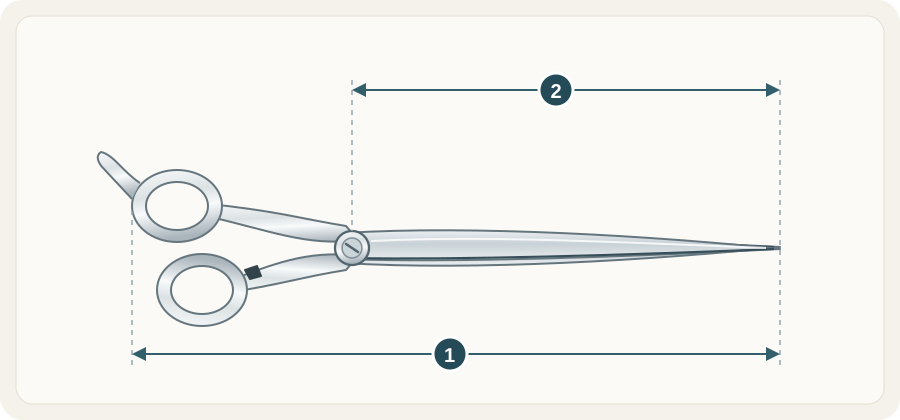 Open illustration at full size
- Overall tool lengthCompare the maker’s stated whole-tool size. Finger-rest treatment can vary.
- Blade lengthA separate blade measurement. Check the model specification rather than converting its nominal inch label.
Use the size guide for those separate fields. If the required blade measurement is missing from the offer, ask for it rather than measuring a tilted product photo.
Compare construction for one cutting job
Keep the cutting hand and intended movement fixed. Record the exact model’s handle shape, edge, blade line and pivot system, then compare those with your familiar shear. A series name cannot establish how the rings fit your fingers.
Hikari’s shop separates blunt-cutting scissors, slide-cut scissors and left-handed scissors. Use the appropriate category and selected model specification rather than assume every cutter is intended for the same movement. The blade vocabulary guide helps name the feature you want to change.
Confirm the Australian purchase and service route
The official shop asks buyers to enquire about delivery. Confirm supply to your Australian address, the selected order total, returns and who handles an adjustment or edge service. A Japanese catalogue page supplies model research; the selling channel supplies the terms of your order.
For broader context, read the Hikari profile and seller checklist. If you want a stocked model comparison at a familiar size, Yasaka SL and Joewell FX show how exact blade, handle and length fields make the decision useful.
A closer look at shears
Comparing two models? Send us their names or SKUs and the cutting work you have in mind.
Latest blog posts
Read all blog posts
13 places to buy professional hair scissors online
Thirteen websites that sell professional hair scissors, listed A to Z, with a short box of things to check before you buy.
10 Christmas Gift Ideas for Hairdressers and Barbers
Ten gift ideas for a hairdresser, barber or apprentice, by situation: gift card, case, holster, care kit, combs, razor blades and a first-kit contribution.